Every enterprise integration project eventually runs into the same wall: two systems that describe the same real-world entity — a customer, an order, a claim, a member — using two entirely different schemas. Closing that gap is the job of data mapping solutions, and how well an organization does that job determines whether new trading partners onboard in days or in months, whether a migration finishes on schedule, whether a data quality incident gets caught before it reaches a report, and whether the data landing in the target system can actually be trusted downstream.
This guide walks through what data transformation platforms actually do, how the field mapping process works end to end, where manual and semi-automated approaches break down at enterprise scale, and what to look for in modern, intelligent data transformation platforms. Along the way we'll cover the data mapping process step by step, the most common data mapping challenges enterprises run into, real data mapping examples across industries, how governance and data quality fit into a mapping program, and how to choose the right platform for your own environment's requirements. We'll also look at where automation is heading next, and why so many integration teams are re-evaluating the data transformation platforms they standardized on years ago.
For most enterprises, data doesn't originate in one tidy place. Data arrives from acquired businesses running their own systems, from SaaS applications different departments adopted independently, from regulators who specify their own data formats, and from trading partners who each run their own platform on their own schedule. An enterprise data strategy has to account for all of that data across different shapes and turn it into something one enterprise data model can actually consume. That translation work, converting one organization's data into another organization's data, is exactly what a data mapping platform automates. Enterprise data volumes have grown so quickly that hand-building every data pipeline, one integration at a time, simply can't keep pace with how much data modern platforms are now expected to ingest, transform, and deliver every day, across every business unit that depends on it.
What Are Data Mapping Solutions?
Data is the raw material every business system runs on, and data rarely shows up in the shape the receiving system expects. Customer data, order data, claims data, payroll data, shipment data — each of these categories of data typically has as many shapes as there are systems that produce it, and reconciling all of that data into one usable form is the entire reason this discipline exists. At its core, data mapping is the discipline of defining how individual data fields in a source system correspond to fields in a target system, and what conversion rules need to run in between. That correspondence might be a simple one-to-one match — source.first_name to target.first_name — or something far more involved: concatenating two fields into one target field, splitting a single field into several target fields, translating a code list, converting a date format, applying a unit conversion, or running a lookup against reference data.
Data mapping platforms are the systems and frameworks that let integration teams define, test, deploy, and maintain these field-level correspondences at scale. Rather than hand-coding a script for every new source, a modern data transformation platform provides a structured environment where an analyst or developer can build the correspondence, validate it against sample data, and push it into production as part of a broader integration pipeline.
The stakes of getting mapping right are higher than they look. A single mis-mapped field such as a date parsed in the wrong format, a code list translated incorrectly, a required field left null, can silently corrupt every downstream record until someone notices the resulting report doesn't add up. That's why data transformation sits at the center of data quality, data governance, and integration reliability conversations inside almost every enterprise IT organization.
Data mapping platforms also have to account for the sheer variety of data enterprises handle day to day: structured data sitting neatly in relational tables, semi-structured data such as JSON or XML payloads, and increasingly unstructured data extracted from documents. Whatever shape the incoming data takes, a data transformation platform has to normalize it into the canonical data model the enterprise standardizes on internally, so that every downstream application, data warehouse, or analytics platform consumes data in one consistent shape rather than a different shape per feed. The strongest tools make that normalization repeatable rather than bespoke, which is the real difference between an enterprise data program that scales cleanly and one that collapses under its own maintenance burden a year or two in.
Every enterprise data program eventually confronts the same reality: data quality problems rarely originate in the data itself; they originate in how data was translated on the way from one system to another. A data mapping platform is, in effect, a data accuracy checkpoint sitting between every pair of systems that exchange data. Data that passes through a well-built correspondence arrives clean, complete, and consistent; data that passes through a poorly built one carries forward every ambiguity in the original schema, plus whatever new errors the translation step introduced along the way. Data teams that treat this work as a first-class data discipline, rather than as plumbing to be built once and forgotten, tend to have far fewer data incidents downstream, and spend far less time chasing where a specific piece of bad data actually came from.
Good data mapping platforms also make it easier to see data the way the business sees it. A data steward doesn't think in terms of XPath expressions or column indexes; they think in terms of "customer data," "order data," and "policy data." Platforms that expose data translation decisions using that same business vocabulary, rather than raw technical field names, make it possible for the people who actually own the data, not just the people who move the data, to review and sign off on how their data gets translated.
Data Mapping vs. ETL vs. Data Integration
These three terms get used interchangeably, but they describe different layers of the same problem. Data integration is the umbrella discipline: connecting disparate systems so data moves reliably between them. ETL — extract, transform, load — is a specific pattern for data integration, most commonly used for batch movement of data from source systems into a data warehouse or downstream application. Data mapping is a component that lives inside both: it's the specific work of defining field correspondence and conversion logic, whether that logic runs inside a full ETL pipeline, a real-time API integration, or a one-time data migration.
Put another way, an ETL platform without a strong data transformation capability is only half a platform. The "extract" and "load" stages are largely mechanical — connect to a source, connect to a target. The "transform" stage is where the actual mapping work happens, and it's traditionally been the most labor-intensive part of any integration or ETL project. Modern data transformation platforms increasingly separate the mapping layer from the orchestration layer entirely, so the same mapping logic can be reused whether it's running inside a scheduled ETL batch job, a real-time API call, or an event-driven automation.
How Source-to-Target Field Mapping Works
Source-to-target field mapping starts with two schemas: the source schema, describing the structure and semantics of the incoming data from the data source, and the destination schema, describing what the destination system expects. A data mapping tool loads both schemas side by side and helps the user establish correspondence between them, field by field.
Some fields map cleanly: a source field named customer_id and a destination field named customer_id are an obvious match. Others require semantic reasoning: a source field named cust_no mapping to a destination field named customer_id requires recognizing that the two represent the same concept despite different naming conventions. Still others require genuine conversion logic: a source field holding a full name as free text needs to be split into first, middle, and last name fields on the destination side; a source date field in MM/DD/YYYY format needs conversion to ISO 8601 before it lands in the destination schema; a source status code needs translation through a lookup table before it matches the destination system's own code list.
Once every field is accounted for then mapped, transformed, or explicitly marked as unused, the correspondence is validated against real or sample data, checked for exceptions, and deployed. From that point forward, every record that flows from origin to destination runs through the same translation logic, which is exactly why getting the mapping right matters so much: a small error compounds across every single record that passes through it.
Types of Data Mapping Solutions
Not all data mapping platforms work the same way, and the differences matter enormously at enterprise scale. Broadly, data mapping platforms fall into three categories, each representing a different level of automation and a different tradeoff between control and speed.
Manual and Spreadsheet-Based Mapping
The most basic form of manual data mapping is still extremely common: an analyst opens a spreadsheet, lists every source field in one column and every destination field in another, and manually documents the correspondence and any conversion notes. An engineer then reads that spreadsheet and hand-codes the actual conversion logic in SQL, in a scripting language, or directly inside whatever integration tool the organization has standardized on.
Spreadsheet-based mapping has one real advantage: it requires no special tooling. Anyone who can use a spreadsheet can document a correspondence. But it scales poorly. There's no validation step built into a spreadsheet as nothing catches a typo in a field name or a conversion rule that doesn't actually match the destination schema's constraints. Every correspondence has to be translated by hand into working code, which introduces a second point of failure between what the analyst documented and what the engineer built. And when a source schema changes, someone has to notice, update the spreadsheet, and get the corresponding code change deployed, which is a process with no automated safety net.
Semi-Automated Mapping Tools
The next tier of data mapping platforms provides a visual interface for building mappings, often with drag-and-drop field connections, built-in conversion functions, and some degree of schema validation. These tools reduce the translation gap between "what was documented" and "what actually runs," because the mapping and the executable transformation logic are the same artifact.
Most established integration platforms operate at this tier. The mapping tool understands both schemas, offers a library of built-in functions for common transformations — string manipulation, date formatting, arithmetic, conditional logic — and generates the underlying code, often XSLT or a similar transformation language, from what the user builds visually. This is a meaningful improvement over spreadsheets, but the field-matching work itself is still manual: a developer or analyst has to look at both schemas and decide, field by field, what corresponds to what. For a company onboarding dozens or hundreds of new sources a year, that manual matching step remains the primary bottleneck for moving data across systems.
AI-Powered Automated Data Mapping
The newest tier of data mapping platforms uses machine learning to automate the field-matching step itself, not just the execution of the transformation. An intelligent, pattern-driven data mapping tool analyzes the source and destination schemas, proposes field-by-field correspondences based on pattern recognition and semantic reasoning, and surfaces those proposed mappings with confidence scores for human review. Instead of a developer starting from a blank canvas, they start from a mostly-complete proposed correspondence and spend their time reviewing, correcting, and approving rather than building from scratch.
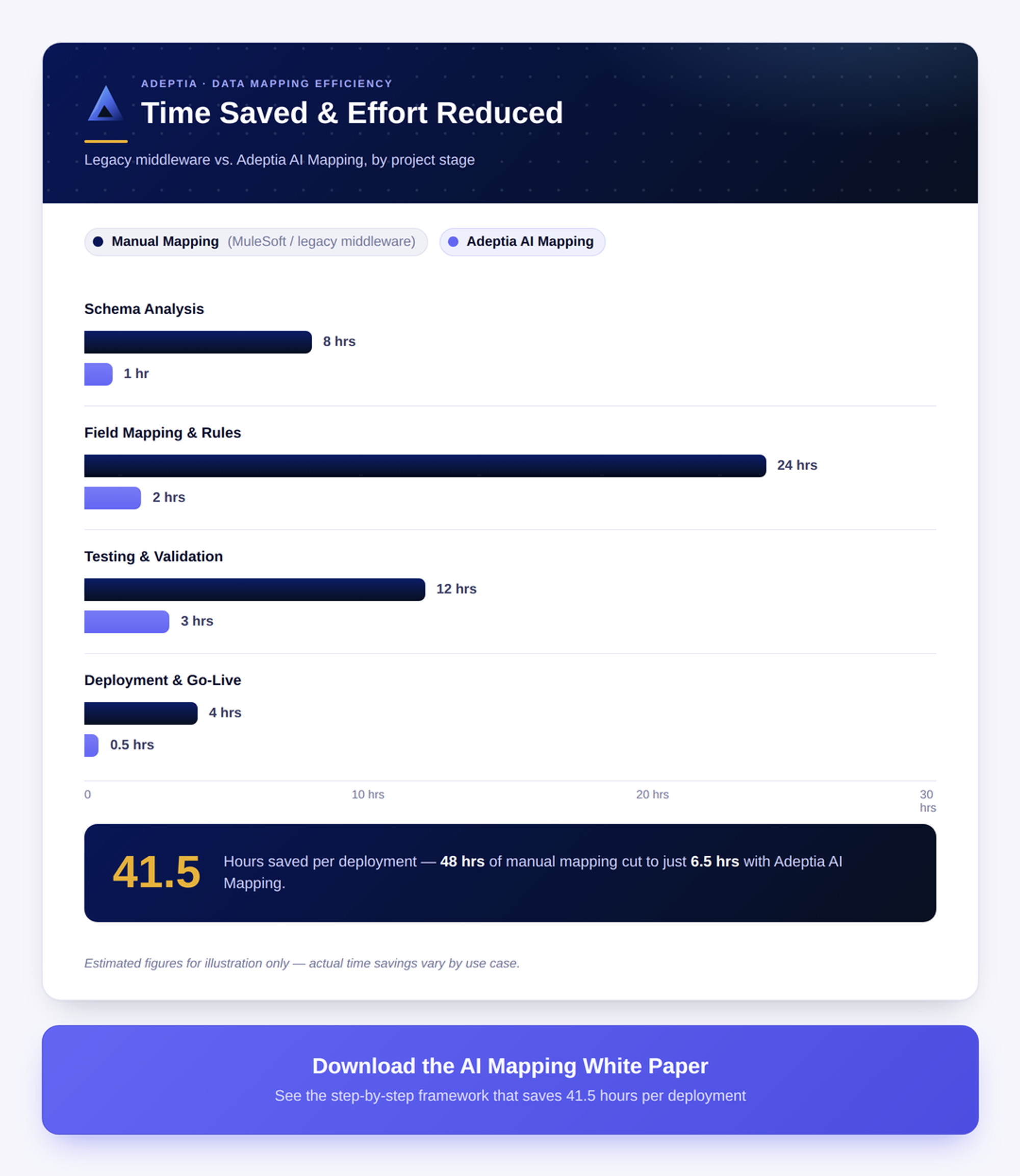
The best intelligent data mapping platforms combine two complementary approaches. Pattern-based machine learning matches new schemas against a library of previously validated mappings, and if a similar pattern has been mapped before, the system proposes the same match with high confidence. Generative reasoning handles the residual elements that don't match any known pattern, using field names, sample values, and business context to propose a plausible correspondence. Together, these two engines can resolve the large majority of elements automatically, leaving only the genuinely ambiguous or highly domain-specific cases for a human to decide. This is where automation compresses what used to be weeks of engineering work into hours of review work, and it's the direction essentially every serious data mapping vendor is now investing in.
The Data Mapping Process in 5 Steps
Regardless of which type of data mapping tool an organization uses, the underlying process follows a consistent five-step pattern. Understanding these steps helps clarify exactly where automated data transformation platforms save the most time, and where human judgment remains essential.
Step 1: Define Scope and Source Systems
Every mapping project starts by defining scope: which data source system, which destination system, which specific fields or transaction types are in play, and what the business objective is. This step also involves identifying who owns the source data, who owns the destination schema, and who needs to sign off on the finished result. Skipping this step by jumping straight into field matching without a clear scope, is one of the most common causes of integration projects running long, because ambiguity about scope tends to surface only after work has already started.
Step 2: Profile Source Data and Formats
Before any field can be matched, the source data itself needs to be understood. Data profiling means examining real or representative sample data from the source system: what format are dates in, what values actually appear in a given field, are there nulls where the schema documentation says there shouldn't be, does a supposedly numeric field sometimes contain text. Profiling catches the gap between what a source schema says it will send and what it actually sends which is where most field-matching failures originate. Enterprise source systems, especially older ones, are notorious for schema documentation that lags behind the data that's actually flowing.
Step 3: Match Fields and Set Transformation Rules
This is the step most people think of when they think of "data mapping" which is establishing the field-by-field correspondence between source and destination, and defining the conversion rules needed to convert one to the other. It's also the step where automated data mapping software delivers the largest time savings, since pattern-based matching and intelligent field matching can propose the bulk of the correspondence automatically, leaving the integration team to review, adjust, and fill in the genuinely novel cases. Transformation rules at this step run the gamut from trivial (copy the value as-is) to complex (multi-field conditional logic, code-list lookups against reference tables, cross-field validation).
Step 4: Validate and Test the Mappings
A proposed mapping, whether built by hand or proposed by an algorithmic system, has to be validated before it goes anywhere near production. Validation means running real or representative sample data through the correspondence and checking the output against the destination schema's expectations: are required elements populated, do data types match, do transformed values fall within expected ranges, does the record pass whatever business rules the destination system enforces. This step catches errors that are invisible when just looking at the definition itself, such as a conversion rule that looks correct on paper but still produces garbage output when it meets a value nobody anticipated.
Step 5: Deploy, Monitor, and Handle Schema Drift
Deploying a mapping into production isn't the end of the process, it's the start of an ongoing maintenance obligation. Source schemas drift: a trading partner adds a new field, deprecates an old one, or quietly changes what values a code field can contain. Target schemas drift too, as internal systems upgrade or business requirements change. A mature data transformation solution monitors production data flow for signs of drift such as unexpected new fields, unmapped values, a sudden spike in validation failure, and flags it before it becomes a downstream data quality incident rather than after.
Common Data Mapping Challenges in the Enterprise
Enterprises running dozens, hundreds, or thousands of active integrations run into the same handful of data mapping challenges over and over. Understanding them is the first step toward choosing tools that actually address the root cause rather than papering over the symptom.
Not ready for a full demo? Get a free assessment of your current data mapping setup →
Schema Drift and Changing Partner Formats
Trading partners, SaaS vendors, and internal systems change their schemas more often than most integration teams would like. A partner adds an optional field mid-year. A SaaS vendor pushes a platform update that renames a handful of fields. A regulatory body updates a standard transaction format. Every one of these events potentially breaks an existing correspondence, and if there's no automatic detection in place, the first sign of trouble is often a downstream failure that someone has to trace back to its origin hours or days after the schema actually changed.
Developer Bottlenecks and Mapping Backlogs
In organizations where mapping requires specialized technical skills such as writing or reading XSLT, understanding XPath expressions, hand-coding transformation scripts, the integration team becomes a bottleneck almost by definition. Business stakeholders who understand exactly what a new partner's data means often can't build the correspondence themselves; they have to write requirements, hand them to an engineer, review what comes back, and iterate. Each round trip adds days. Multiply that across a backlog of new partner onboarding requests and the resulting backlog quickly becomes the single biggest constraint on how fast an enterprise can grow its integration footprint.
Unstructured and Semi-Structured Documents
Not every source arrives as a clean, structured format. A meaningful share of enterprise data still arrives as PDFs, scanned documents, faxes, or semi-structured text — an invoice, a claim form, a supplier document. Traditional data mapping software assumes structured input; it has nothing to say about a PDF. Handling these sources well requires pairing a document-extraction capability, typically some form of intelligent document processing, with the translation layer, so that once fields are extracted from an unstructured document, the same mapping and transformation logic that handles structured sources can take over.
Compliance and Data Governance Requirements
Mapping doesn't happen in a vacuum. It happens inside a governance framework that increasingly matters to regulators, auditors, and customers alike. Enterprises need to know who approved a given correspondence, what transformation logic actually ran on a specific record, and whether personally identifiable or otherwise sensitive attributes were handled according to policy. Data governance requirements push mapping tools toward auditability: every mapping decision needs a trail, every transformation needs to be inspectable, and every exception needs to be traceable back to the record and rule that caused it. Data mapping tools that treat governance as an afterthought create real exposure for regulated industries like financial services, insurance, and healthcare.
Most enterprises don't arrive at this problem with a blank slate. They already own a patchwork of tools: a legacy ETL tool for batch jobs, a handful of point-to-point integration tools built by contractors over the years, a spreadsheet-based process for anything nobody has had time to automate, and maybe one or two modern, intelligent tools brought in for a specific project. Rationalizing that patchwork of tools into a smaller set of platforms that the whole organization actually trusts is, in practice, half the work of any serious data program and it's usually a bigger lift than picking new tools in the first place, because every one of those existing tools has years of undocumented business logic buried inside it that nobody wants to touch.
What to Look for in a Data Mapping Solution
Given the range of challenges above, evaluating data mapping capabilities comes down to a handful of concrete capabilities. Here's what separates a solution that will hold up at enterprise scale from one that will become a bottleneck within a year. None of these capabilities matter in isolation, as the value of a data mapping platform comes from how well the pieces work together across every integration your enterprise runs, not from any single standout feature on a vendor's data sheet. In practice, the data your organization handles is only as trustworthy as the data tools and data processes standing between every origin and every destination, so it pays to evaluate these tools as a system rather than a checklist of individual data features.
AI-Assisted Field Matching
The single biggest lever for reducing mapping time is automated field matching, a system that proposes source-to-target correspondence on its own rather than requiring a human to start from a blank canvas every time. Look for a platform where intelligent proposals come with confidence scores, where high-confidence matches can be applied automatically while lower-confidence ones are surfaced for review, and where the system's proposals actually improve over time as more mappings get validated and approved.
Broad Connector and Format Coverage (EDI, API, Flat File)
A data mapping tool is only as useful as the range of source and destination formats it can actually parse. Enterprise environments deal with EDI transaction sets, REST and SOAP APIs, flat files, fixed-width formats, JSON, XML, and increasingly document-based sources, often all at once, across dozens of business units that never coordinated on a shared data standard. A platform with narrow format coverage forces teams to maintain a second set of tools for anything outside its comfort zone, which defeats the purpose of consolidating on one enterprise platform in the first place. The broader a platform's native connector and format library, the fewer specialized tools an integration team has to license, learn, and keep patched just to keep data moving.
No-Code Interface for Business Users
The best data mapping tools let business users (not just engineers) build and review mappings directly. A no-code or low-code interface, ideally one that accepts plain-language descriptions of intent rather than requiring XSLT or scripting knowledge, removes the single most common bottleneck in enterprise integration: the dependency on a small number of specialized engineers to build every correspondence by hand. Tools that put this work in front of the people who actually understand what the data means tend to produce a more accurate result than tools that route everything through an intermediary who has to guess at intent.
Reusable Templates and Transformation Rules
Rather than building every mapping from scratch, mature data mapping tools let teams encode a mapping pattern once for a given transaction type, industry standard, or system integration, and reuse it across many source or destination variations. A reusable template captures the 80% of an integration pattern that's common across similar integrations, so that onboarding the next partner using the same transaction format only requires handling the incremental differences rather than rebuilding the whole thing. Over time, a library of reusable templates becomes one of the platform's most valuable organizational assets, a compounding record of every transformation pattern the organization has already solved, available to the next integration rather than reinvented from zero.
On-Premises, Cloud, and Hybrid Deployment
Enterprise data transformation requirements vary widely by industry and regulatory posture. Some organizations need a fully cloud-hosted platform; others, particularly in financial services, insurance, and healthcare, need on-premises or hybrid deployment to keep sensitive data within their own infrastructure. A data transformation solution that only supports one deployment model automatically disqualifies itself for a meaningful share of buyers, so flexibility here is a genuine differentiator rather than a checkbox feature. Enterprises evaluating a new platform should ask, specifically, whether the same mapping and transformation logic behaves identically whether it's deployed in the cloud, on-premises, or split across both. Inconsistent behavior across deployment models is a common cause of production surprises.
Data Quality, Lineage, and Governance Controls
Finally, a serious data transformation platform treats data quality and governance as first-class features, not afterthoughts. That means built-in validation rules, exception handling that routes failed records for review rather than silently dropping them, an audit trail that shows who approved which correspondence and when, and lineage tracking that lets a data steward trace any destination field back to its originating source field and the transformation rule that produced it. These data mapping capabilities matter as much for internal confidence in the data as they do for satisfying external auditors.
Data Mapping Examples and Use Cases
Abstract principles are easier to evaluate against real scenarios. Here's how this work shows up across a few common industry use cases.
Partner and Supplier Onboarding
Every new trading partner brings its own variation on a shared transaction format: a supplier's purchase order acknowledgment, a distributor's inventory feed, a vendor's invoice format. Traditional practice treats each new partner as a fresh project: days or weeks of schema analysis and hand-built transformation logic. With intelligent, pattern-driven data mapping tools and reusable templates, most of the pattern is already known from prior partners using a similar format, and the work compresses to reviewing and approving what the tool proposes, with human attention reserved for the elements that are genuinely specific to that one partner. For an organization onboarding dozens of new partners a quarter, that compression in turnaround time is often the single biggest lever available for growing the integration program without growing headcount at the same rate.
Customer Data Onboarding in Financial Services
Financial institutions regularly need to bring in customer data from an acquired business, a new channel partner, or a new data provider. The stakes are high, as errors in customer data transformation can mean compliance exposure, incorrect account setup, or downstream reconciliation failures. Financial services teams increasingly lean on data mapping tools that combine automated field matching with strict validation and governance controls, so that speed doesn't come at the cost of accuracy or auditability. Because customer data in financial services is subject to some of the strictest governance and privacy rules of any industry, the platform's audit trail and lineage capabilities matter just as much here as the raw speed of the mapping itself.
EDI Exchange in Manufacturing and Distribution
Manufacturers and distributors have relied on EDI for decades to exchange purchase orders, shipping notices, and invoices with trading partners. Every partner implements the standard slightly differently with different optional segments, different code list conventions, different qualifier usage. Modern data mapping tools that understand transaction-set structures natively, and that can absorb per-partner variation within a reusable template, let manufacturing and distribution teams onboard new trading partners in days rather than the six-to-eight-week timelines that used to be standard. As order volumes and partner counts grow, the same mapping platform typically also becomes the organization's operational record of every transaction exchanged, which matters when a dispute over a purchase order needs to be traced back to the exact data that was sent and received.
Data Migration and System Consolidation
Migrating from a legacy ERP, CRM, or core system to a new platform requires mapping potentially thousands of elements between the old schema and the new one, often as a one-time but high-stakes project with a hard cutover deadline. Migration projects benefit enormously from intelligent, pattern-driven data transformation because the volume of elements to match is so large that manual mapping alone would blow through most project timelines. The same holds true for company mergers and system consolidations, where two organizations' schemas, and often two entirely different corporate platforms, need to be reconciled into one shared data model before the cutover date arrives.
How to Choose the Right Data Mapping Solution for Your Organization
Choosing among data mapping tools starts with an honest inventory of your own integration footprint: how many active source and destination systems are involved, how frequently new ones get added, what formats you actually deal with day to day (EDI, API, flat file, document-based, or some mix of all four) and how much of your mapping work currently depends on a small number of specialized engineers.
From there, weigh the tradeoffs deliberately. A platform with strong intelligent, self-improving mapping and a no-code interface will do the most to relieve engineering bottlenecks, but only if it also gives your team enough visibility into the underlying transformation logic to trust and, when necessary, override what the system proposes. A platform with deep format coverage matters more if your integration footprint spans EDI, healthcare, and API-based sources rather than a single, homogeneous format. Deployment model matters enormously if you operate in a regulated industry with data residency requirements. And oversight and lineage capabilities matter more the more auditors, regulators, or downstream business-critical decisions depend on the data your mappings produce.
The best approach is usually to pilot a data transformation solution against a real, messy source your team has already struggled with, not a clean demo schema, and measure how much of the result the tool gets right on the first pass, how clear the review-and-approval workflow is for the parts it doesn't get right, and how the platform behaves six months later when that same source's schema inevitably changes.
Frequently Asked Questions About Data Mapping Solutions
Automate Data Mapping with Adeptia
Adeptia builds AI-native data mapping directly into its Automate platform, and the newest release changes what "AI-assisted mapping" actually means in practice. Earlier versions of Adeptia's AI mapping capability offered suggestions inside an otherwise manual, code-first workflow which was useful but still built around a human doing most of the construction work. The latest release replaces that workflow rather than layering another suggestion feature on top of it.
Instead of starting from a blank mapping canvas, users describe what they need in plain language. An AI agent asks clarifying questions, builds the correspondence, and validates it against real or sample data before anything gets published, whether end-to-end or down to a single field. Business users who previously had to hand every requirement to an engineering team can now build mappings directly, removing the single most common bottleneck to onboarding a new trading partner or standing up a new integration.
Every mapping the agent builds teaches the underlying knowledge base something new, and that knowledge compounds across an organization's entire mapping history: the hundredth mapping benefits from everything learned building the previous ninety-nine, automatically, with no manual tagging required. Crucially, none of that AI reasoning runs at execution time. What ships to production is compiled, native code: zero AI in the loop at runtime, zero added latency, and zero per-execution model cost. And the generated logic is never hidden. Any user with the right role can open it, inspect it, and edit it directly, so the simplicity of the AI-driven default experience never comes at the cost of transparency for power users who need to look under the hood.
On the enterprise trust side, the platform runs on the customer's own choice of model — Anthropic, OpenAI, Azure OpenAI, or AWS Bedrock — using the customer's own account and API key, set once at deployment. Each customer's knowledge base runs fully isolated at the deployment level, and self-hosted deployments mean Adeptia has zero access to that data at all. None of it trains a shared model across customers, and each organization's mapping history stays its own asset rather than shared training data for anyone else's platform.
If your integration team is spending more time mapping fields than building new capability, or if a backlog of trading partners is waiting on engineering bandwidth that doesn't exist, it's worth seeing what AI-driven data mapping actually looks like against your own schemas rather than a clean demo. Talk to your Adeptia team about a live AI Mapping demo and bring the messiest source system you've got.
None of this replaces the judgment of the people who actually own the data. What it changes is where their time goes: less of it spent typing out field-by-field correspondence by hand, more of it spent deciding whether a proposed correspondence actually reflects what the business needs the data to mean. Enterprises that get this right treat their data mapping platform the same way they treat any other piece of core data infrastructure with clear ownership, a defined set of tools everyone actually uses, real data checks at every boundary, and a documented history of every data decision made along the way. Enterprises that get it wrong end up with a graveyard of undocumented data pipelines, a rotating cast of tools nobody fully trusts, and a growing backlog of data problems nobody has time to trace back to their origin. The gap between those two outcomes rarely comes down to how clever any single tool is. It comes down to whether data mapping was treated, from the start, as a durable platform capability rather than a one-off project to be finished and forgotten.
Ready to see it on your own data?
Every mapping headache in this guide — the backlog, the brittle spreadsheets, the schema that changed without warning — has the same fix: stop mapping data by hand and start reviewing it. Bring Adeptia your ugliest source file, your most-delayed partner onboarding, or the integration your team has been dreading, and we'll show you a working mapping in minutes, not weeks.
Schedule a live AI mapping demo