How It Works and How to Integrate It
Most integration teams meet FHIR the same way. A partner, a regulator or an EHR vendor sends over an endpoint URL and a set of credentials, and someone has to make it work with the healthcare systems the business already runs.
This guide is for that moment. It covers what a FHIR API is, how requests and responses work, where FHIR APIs show up across the healthcare industry, and what it takes to connect them to enterprise systems that were never built to speak FHIR.
What Is HL7 FHIR?
FHIR (Fast Healthcare Interoperability Resources) is a healthcare data standard developed by HL7 International for the electronic exchange of health information. It breaks clinical and administrative data into small, defined units called FHIR resources and exchanges them using familiar web standards.
HL7 FHIR vs. HL7 v2: Key Differences
HL7 v2 sends pipe-delimited messages when an event happens, such as an admission or a lab result, over point-to-point interfaces. HL7 FHIR lets an authorized system request exactly the patient data it needs, when it needs it, through a web API.
| HL7 v2 | HL7 FHIR | |
|---|---|---|
| Exchange | Pushed event messages | Requested on demand through an API |
| Format | Pipe-delimited segments | JSON or XML resources |
| Consistency | Varies by interface | Profiles and implementation guides |
| Skills needed | HL7 interface specialists | Standard web developers |
Is FHIR Replacing HL7?
No. FHIR is an HL7 standard, and HL7 v2 still runs inside nearly every health system. What is changing is where each one is used: HL7 v2 for internal event feeds, and FHIR for apps, partners, payers and patient access. Most healthcare organizations will run both for years. If you manage HL7 v2 feeds today, see how Adeptia handles healthcare EDI and HL7 integration.
What Is a FHIR API?
A FHIR API is an application programming interface that exposes healthcare data as FHIR resources and follows the FHIR core specification for how those resources are read, created, updated and searched. Every FHIR server has a service base URL, such as https://fhir.example.org/r4, and publishes a CapabilityStatement at its /metadata endpoint. That statement lists the resources, operations and search parameters the server supports, and it is the first piece of API documentation an integration team should read.
What Is the Difference Between an API and a FHIR API?
An API is any interface one system offers so another can use its data or functions. A FHIR API is a specific kind of API with a shared data model, standard resource names, standard search rules and standard security. Two FHIR APIs from different EHR vendors look far more alike than two custom APIs ever would, which is what makes standardized data exchange possible at scale.
Is FHIR a REST API?
Yes, in most cases. FHIR defines a RESTful API as its primary exchange pattern, so most FHIR APIs are RESTful APIs built on REST principles. Each resource type has its own URL, and clients use standard HTTP methods to work with it. FHIR also supports bulk export, messaging and documents for cases where one REST call at a time is not the right fit.
What Is a FHIR R4 API?
R4 is the release of FHIR that most production systems use today, and it is the version US regulations reference. A FHIR R4 API is simply a FHIR API built on that release, usually alongside an implementation guide such as US Core. Newer releases exist, so always check which version a partner's server runs before you build against it.
FHIR Resources: The Building Blocks
A resource is a single unit of healthcare data with a known structure, such as Patient, Encounter, Observation, Coverage or Claim. Each resource has an identifier, a defined set of fields and references to related resources. An Observation points to its Patient, and a Claim points to its Coverage. Linking resources lets one standard data model represent everything from a single vital sign to a patient's full electronic health record.
How a FHIR API Works
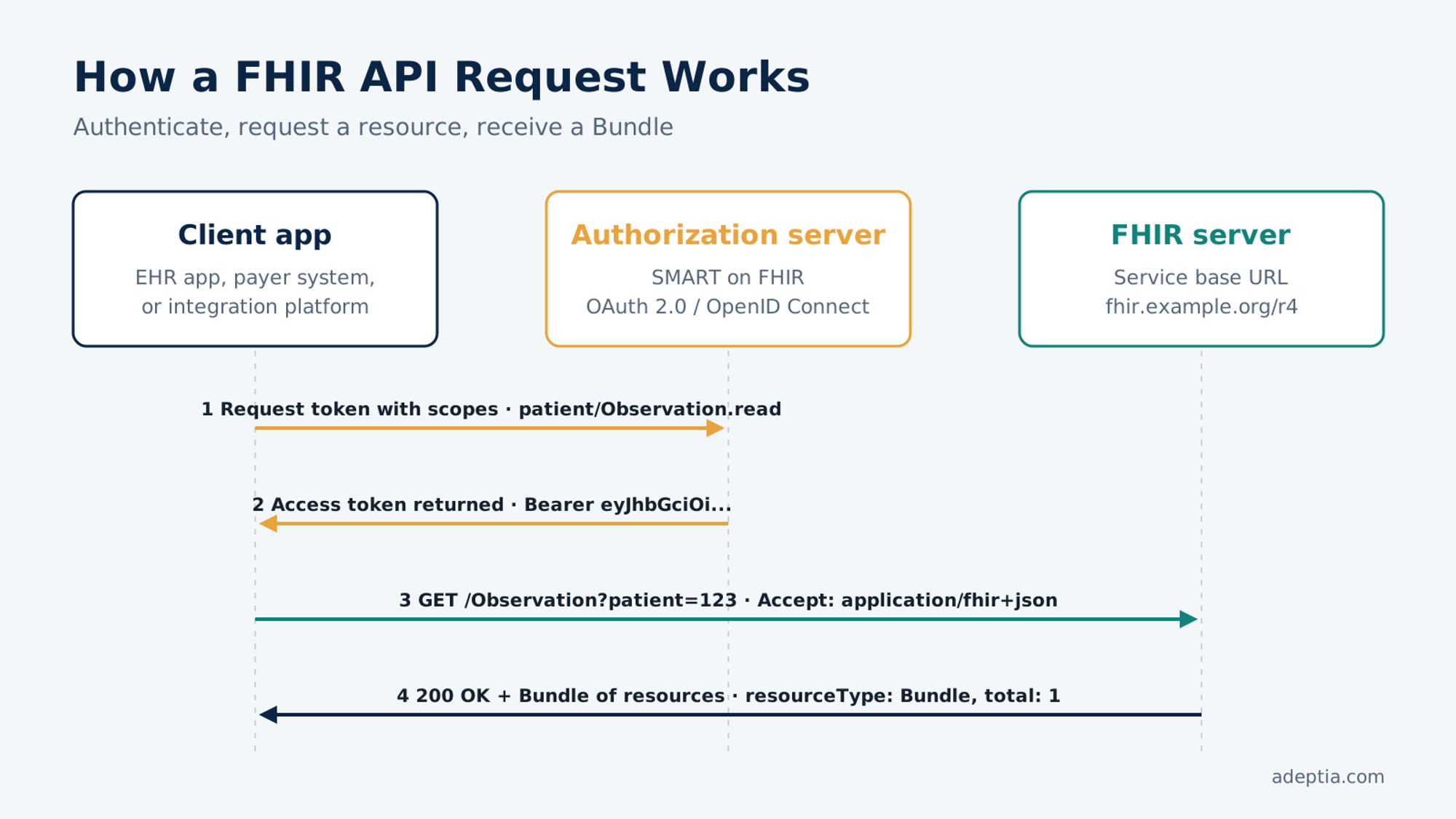
A client authenticates, sends an HTTP request to a resource endpoint, and gets back a resource or a Bundle of resources. The pieces below cover nearly every call you will make.
RESTful Interactions (GET, POST, PUT, DELETE)
| Method | Example | What it does |
|---|---|---|
| GET | GET /Patient/123 | Read one resource by ID |
| GET | GET /Encounter?patient=123&date=ge2026-01-01 | Search with parameters |
| POST | POST /Observation | Create a new resource |
| PUT | PUT /Coverage/456 | Update a resource |
| DELETE | DELETE /Appointment/789 | Remove a resource |
Searches return a Bundle, a container resource with the matching results and paging links. Operations such as $everything or $member-match handle tasks that do not fit a single RESTful call.
Data Formats: JSON or XML
FHIR resources can be sent as JSON or XML, chosen with the Accept and Content-Type headers (application/fhir+json or application/fhir+xml). JSON dominates new builds because it is lighter and native to web and mobile development.
FHIR API Example Request
Here is an example of a client asking for a patient's most recent blood pressure reading:
GET https://fhir.example.org/r4/Observation?patient=123&code=http://loinc.org|85354-9&_sort=-date&_count=1
Accept: application/fhir+json
Authorization: Bearer eyJhbGciOi...
The server responds with a Bundle containing the matching Observation resource:
{
"resourceType": "Bundle",
"type": "searchset",
"total": 1,
"entry": [{
"resource": {
"resourceType": "Observation",
"status": "final",
"code": { "coding": [{ "system": "http://loinc.org", "code": "85354-9" }] },
"subject": { "reference": "Patient/123" },
"effectiveDateTime": "2026-09-30",
"component": [
{ "code": { "coding": [{ "code": "8480-6" }] }, "valueQuantity": { "value": 128, "unit": "mmHg" } },
{ "code": { "coding": [{ "code": "8462-4" }] }, "valueQuantity": { "value": 82, "unit": "mmHg" } }
]
}
}]
}
Notice that codes come from standard terminologies like LOINC. That is what lets different healthcare systems agree on what the data means, not just how it is shaped.
HTTP Status Codes: Why a FHIR API Call Fails
When a FHIR API is not working, the HTTP status code and the OperationOutcome resource in the response usually tell you why.
- 200 / 201: The read, search or create succeeded.
- 400: The request or resource is malformed, often a missing required field or a bad search parameter.
- 401 / 403: The token is missing, expired or lacks the right scope.
- 404: The resource ID or endpoint does not exist on this server.
- 422: The resource is well formed but fails the server's profile or business rules.
- 429: The client hit a rate limit and should retry later.
What Security Considerations Apply to FHIR APIs?
Most FHIR APIs are secured with SMART on FHIR, which builds on OAuth 2.0 and OpenID Connect. A client gets an access token with scopes such as patient/Observation.read, and the server only returns data those scopes allow. SMART also defines how apps launch from inside an EHR and how backend services authenticate for system-to-system integration. Beyond the token, teams need TLS everywhere, an audit log of every data access and consent checks before patient data leaves the organization.
Benefits of FHIR APIs for Healthcare Data Exchange
FHIR APIs replace one-off interfaces with a shared, testable standard. For integration teams, that shows up in a few concrete ways:
- Faster partner onboarding. A partner that supports the same implementation guide can connect without a negotiated file format.
- On-demand access. Systems request the healthcare data they need instead of storing every message in case it is needed later.
- Familiar tooling. REST, JSON, and OAuth mean standard developer skills and libraries apply.
- Built-in semantics. Standard terminologies and profiles make interoperability about meaning, not just format.
- Regulatory alignment. ONC and CMS rules require FHIR APIs, so the same investment serves compliance and product goals.
Webinar
Meet Your New AI Mapping Agent
See an AI agent build a data mapping from a plain-language request, live, on November 3.
Common FHIR API Use Cases
EHR Integration
Every certified EHR in the US exposes a FHIR API. Apps use it to read and write clinical data, and SMART on FHIR lets them launch directly inside the clinician's workflow to support patient care. Labs, imaging centers and care management vendors use the same EHR APIs to exchange orders and results with healthcare providers.
Patient Access and Patient Portals
Patients can connect apps of their choice and patient portals to provider and health plan FHIR APIs to view records, claims and coverage. Under CMS rules, payers must offer a Patient Access API, and starting January 1, 2027, it must also include prior authorization information.
Payer and Claims Data Exchange
Health plans use FHIR APIs to share claims and clinical data with in-network providers, transfer member history to a new plan and receive electronic prior authorization requests from provider EHRs. The CMS Interoperability and Prior Authorization Final Rule requires impacted payers to have these APIs live by January 1, 2027. Read how payers are preparing in FHIR Readiness for Payers: Data + AI.
How Do You Get Started with a FHIR API?
These best practices help teams move from a first test call to a production FHIR implementation:
- 1.Read the CapabilityStatement. Call
/metadataon the partner's service base URL to confirm the FHIR version, resources and search parameters. - 2.Get sandbox access. Register an app with the EHR vendor or payer and request the SMART scopes you need.
- 3.Test against public servers. Practice on free sandboxes before touching real data.
- 4.Map your data model. Decide how each internal field maps to a FHIR resource and which profile it must match.
- 5.Validate and monitor. Validate every resource against the profile, log every call and track error rates once live.
FHIR API Integration Challenges
Calling a FHIR API is straightforward. Making it work reliably across many partners and legacy systems is where projects slow down.
Inconsistent Implementations and Versioning
Two servers can both support FHIR and still behave differently. One may run R4 and another STU3, support different search parameters, or require different profiles and extensions. Each new endpoint means checking its CapabilityStatement, testing edge cases and validating every resource against the profile the partner expects.
Legacy Systems That Lack Native FHIR Support
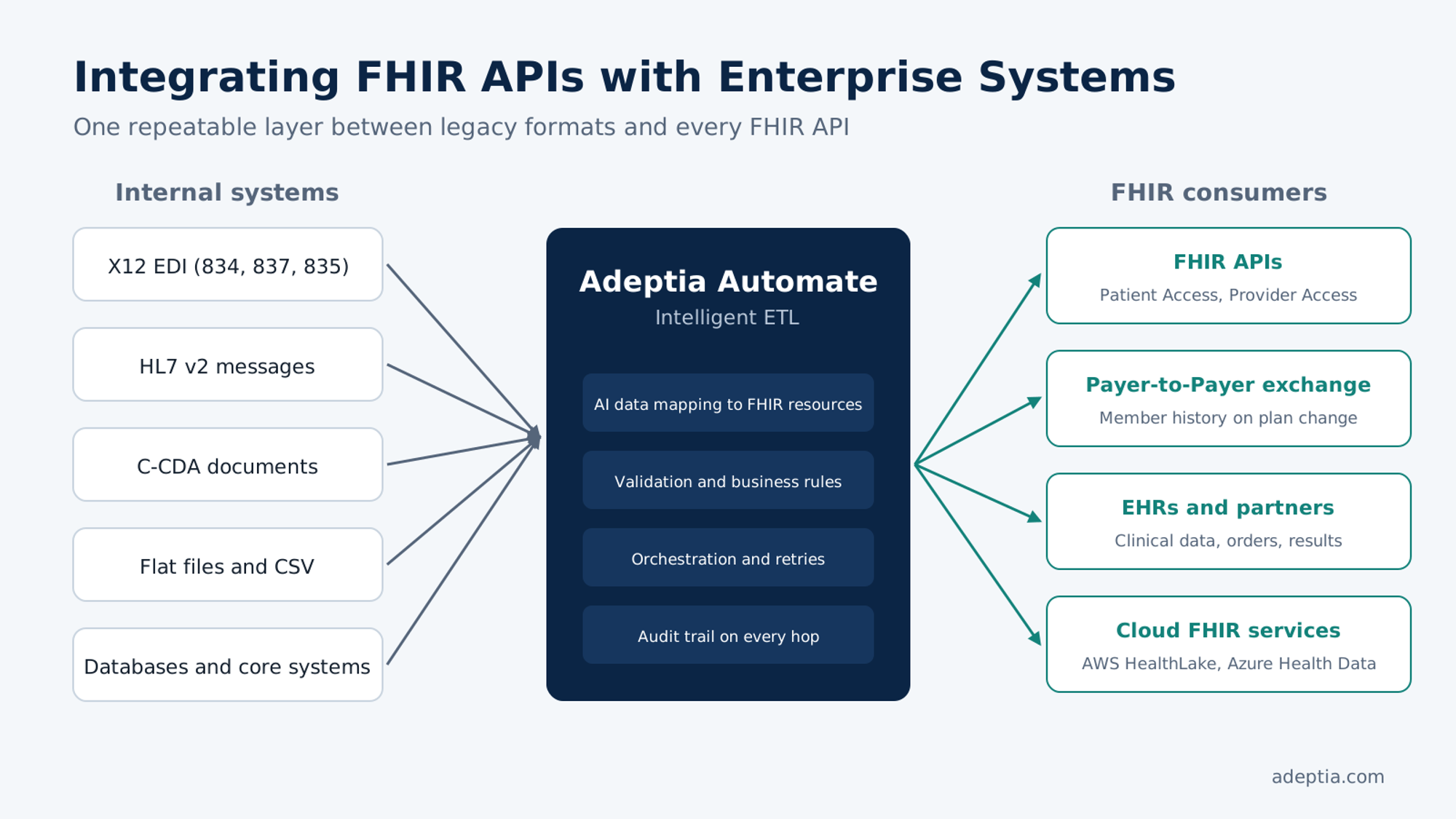
Core claims, enrollment and clinical systems often store data in X12 EDI, HL7 v2, flat files or relational tables. Before those systems can serve or consume a FHIR API, their data has to be translated into resources and back again. That translation layer, not the endpoint, is usually the largest piece of work.
Data Governance, Consent and Compliance
FHIR APIs move protected health information across organizational boundaries. Teams need to enforce consent, limit data to what each scope allows, keep an audit trail of every access, and keep processing where HIPAA, contracts and data residency rules require.
How to Integrate FHIR APIs with Enterprise Systems
The goal is a repeatable layer between your internal systems and every FHIR API you serve or consume, so each new partner is configuration rather than a new project.
Mapping FHIR Resources to Internal Data Models
Start with a canonical model and map each source to it once. For example, an X12 834 enrollment file might map to FHIR like this:
| 834 element | FHIR target |
|---|---|
| NM1 member name (Loop 2100A) | Patient.name |
| DMG date of birth and gender | Patient.birthDate, Patient.gender |
| REF*0F subscriber number | Coverage.subscriberId |
| HD health coverage | Coverage.class and Coverage.period |
An AI data mapping agent can build these field mappings from a plain-language request and sample files, so analysts validate and approve each map instead of building it by hand. For more on enrollment feeds, see integrating HIPAA 834 enrollments with payers.
Orchestrating FHIR, EDI and Non-Healthcare Data Flows
A single business process rarely touches only FHIR. A new member might arrive as an 834, update the claims system, trigger a FHIR Coverage update, feed a CRM and land in the data warehouse. Orchestration ties these steps together with validation, retries, exception routing and a full audit trail across every hop.
On-Premises vs. Cloud Deployment for Regulated Data
Some organizations must keep PHI inside their own data centers. Others use cloud FHIR services such as AWS HealthLake or Azure Health Data Services. A hybrid approach processes sensitive data close to its source while delivering FHIR resources wherever the API runs.
Simplify FHIR API Integration with Adeptia
A FHIR API is only as useful as the data behind it. Adeptia Automate is an Intelligent ETL platform that connects your claims, enrollment, clinical and business systems to FHIR APIs without replacing them. It translates X12 EDI, HL7 v2, C-CDA, files and documents into FHIR resources with AI data mapping, validates them with plain-English AI Business Rules, and orchestrates every flow with a complete audit trail. It runs on-premises, in the cloud or hybrid.
AI builds mappings and rules at design time. At runtime, every integration executes as deterministic, auditable code, with no AI decisions in production.
Schedule a 30-minute FHIR Readiness Assessment and bring a real FHIR integration your team is working through. Prefer a product walkthrough? Request a demo or download the Agentic AI Data Mapping whitepaper.