Every dashboard is only as trustworthy as the data pipeline behind it. When a revenue chart disagrees with the finance report, the BI tool is rarely the cause. The data that reached it is.
That is why ETL business intelligence programs succeed or fail in the integration layer, not the visualization layer. Extract, transform, load (ETL) is the process that gathers data from various sources, cleans and reshapes it through data transformation, and delivers it to a data warehouse where analysts and business users can query it with confidence.
Traditional ETL was built for overnight batch loads from a few internal databases. Enterprise data today arrives from trading partners in dozens of formats, as documents, API calls, EDI files, portal uploads and real-time data streams, with data validation rules that change every regulatory cycle. This guide covers how ETL supports BI under those conditions and what changes when machine learning takes on the data mapping work.
What Is ETL in Business Intelligence?
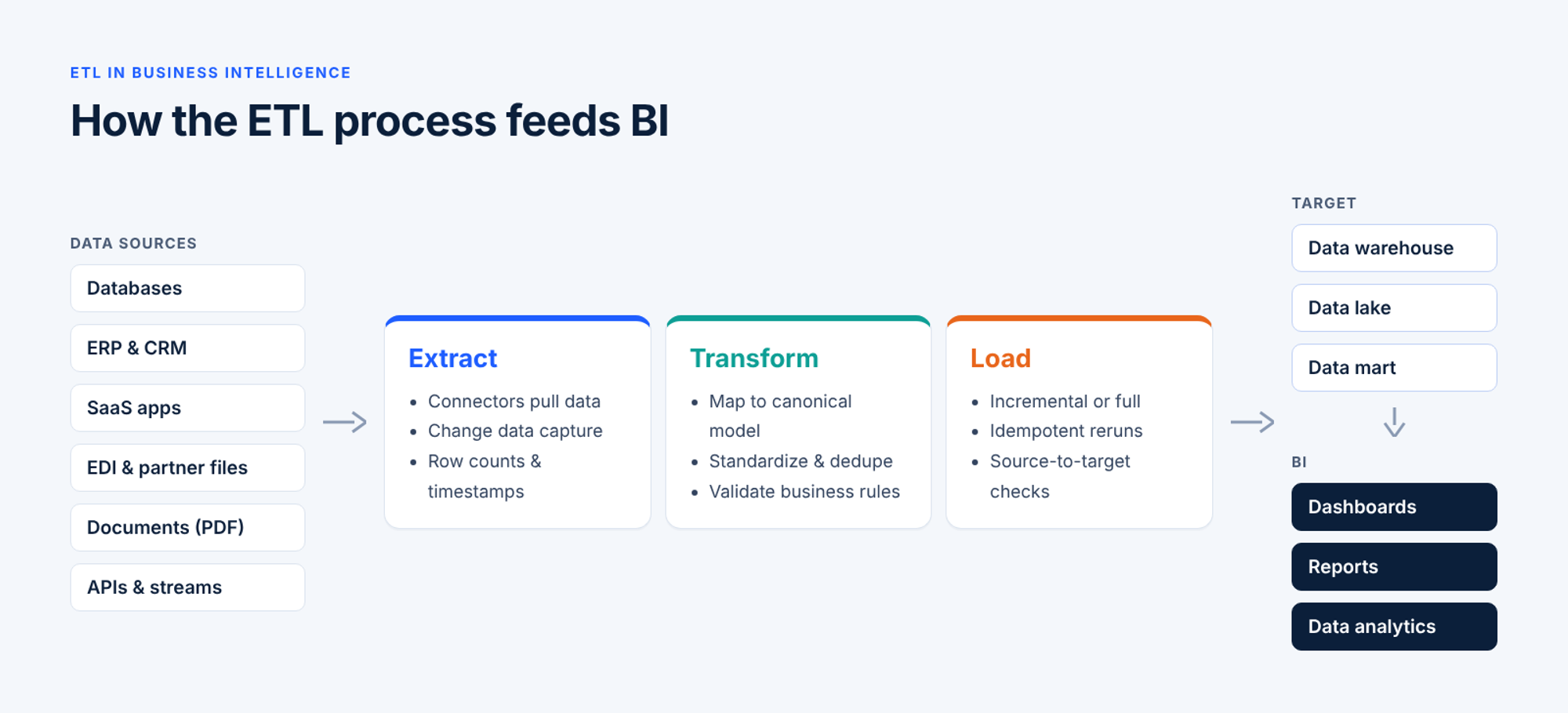
In business intelligence, ETL is the process of extracting data from source systems, transforming it into a consistent, analysis-ready format, and loading it into a data warehouse, data lake or data mart that BI tools read from. A simple definition: ETL is the plumbing that turns raw operational data into reporting data.
Business intelligence is the practice of using that data to answer questions through reports, dashboards and data analytics. The two are separate disciplines, but BI depends on ETL. Without a reliable ETL pipeline, a BI tool has nothing consistent to show.
How Does ETL Work?
ETL provides a repeatable three-step process: extract data from each source, transform it into a consistent model, and load data into the target where BI tools can read it.
Extract: Pulling Data from Source Systems
The extract step reads data from wherever it lives: databases, ERP and CRM platforms, SaaS applications, flat files, EDI transactions, APIs, message queues and documents. A good extract step captures only changed data through change data capture (CDC) and records row counts and timestamps so the data can be reconciled later.
In an ETL tool, connectors do most of this work, handling authentication, pagination and protocol quirks so the analyst can focus on which data to move. The extract step is also where the hardest data enters: partner, supplier and customer data in formats nobody inside the company controls.
Transform: Making Data Analysis-Ready
Data transformation is where raw data becomes usable. Typical transformations include:
- Mapping source fields to the target data model
- Standardizing dates, currencies, units of measure and code values
- Deduplicating records and resolving customer or product identities
- Validating data against business rules and routing exceptions
- Joining, enriching and aggregating data from multiple sources
Data mapping has historically consumed more ETL engineering time than any other task, with field-by-field logic written in XSLT or a proprietary mapping language. It is also where data errors that reach a dashboard are usually introduced, or caught.
Load: Delivering Data to the Warehouse
The load step writes transformed data into the target: a cloud data warehouse such as Snowflake, Amazon Redshift or Azure Synapse, a lakehouse such as Databricks, a data lake on Amazon S3, an on-premises data store such as Teradata, or an operational system. Loads can be full refreshes or incremental, and they run on schedules, on events or in near real time.
A reliable load step is idempotent, so a rerun does not create duplicates. It should also ensure data that landed matches the data that left the source, so no one is analyzing a partial load.
Why Is ETL Important for Business Intelligence?
Most enterprises use ETL for one reason: business intelligence teams rarely lack data. They lack data that agrees with itself. ETL closes that gap in three places business users notice right away.
One Consistent View Across Fragmented Systems
A mid-sized enterprise can run dozens of systems that each hold part of the picture: an ERP for orders and invoices, a CRM for accounts, a policy or claims platform, a payroll provider, a set of SaaS tools, and a long list of partner data feeds. Each system names data differently. A "customer" in the CRM is an "account" in billing and a "member" in the claims system.
ETL is how teams integrate data from these systems into one canonical data model. Once customer, product and transaction data share keys and definitions, a dashboard can join the data without every analyst rebuilding the same logic in a spreadsheet.
Data Quality Your Dashboards Can Trust
Business users lose faith in reporting quickly. One wrong number in an executive report, and people go back to asking finance for the "real" figure. ETL is where teams ensure data quality before bad data reaches the warehouse: required fields are checked, invalid or out-of-range values are caught against business rules, duplicates are merged, and exceptions are routed to someone who can fix them instead of being dropped silently.
Faster Reporting and Less Manual Rework
Without automated ETL, reporting often means analysts exporting CSV data, cleaning it by hand and pasting it into a BI tool every week. That process is slow, hard to audit and stops when the analyst is on vacation.
Automated ETL pipelines run on triggers, apply the same transformations every time and keep a record of every run. Analysts spend their time on data analytics instead of data preparation, and each reporting tool refreshes on schedule.
ETL vs. ELT: Choosing an Approach for Your BI Stack
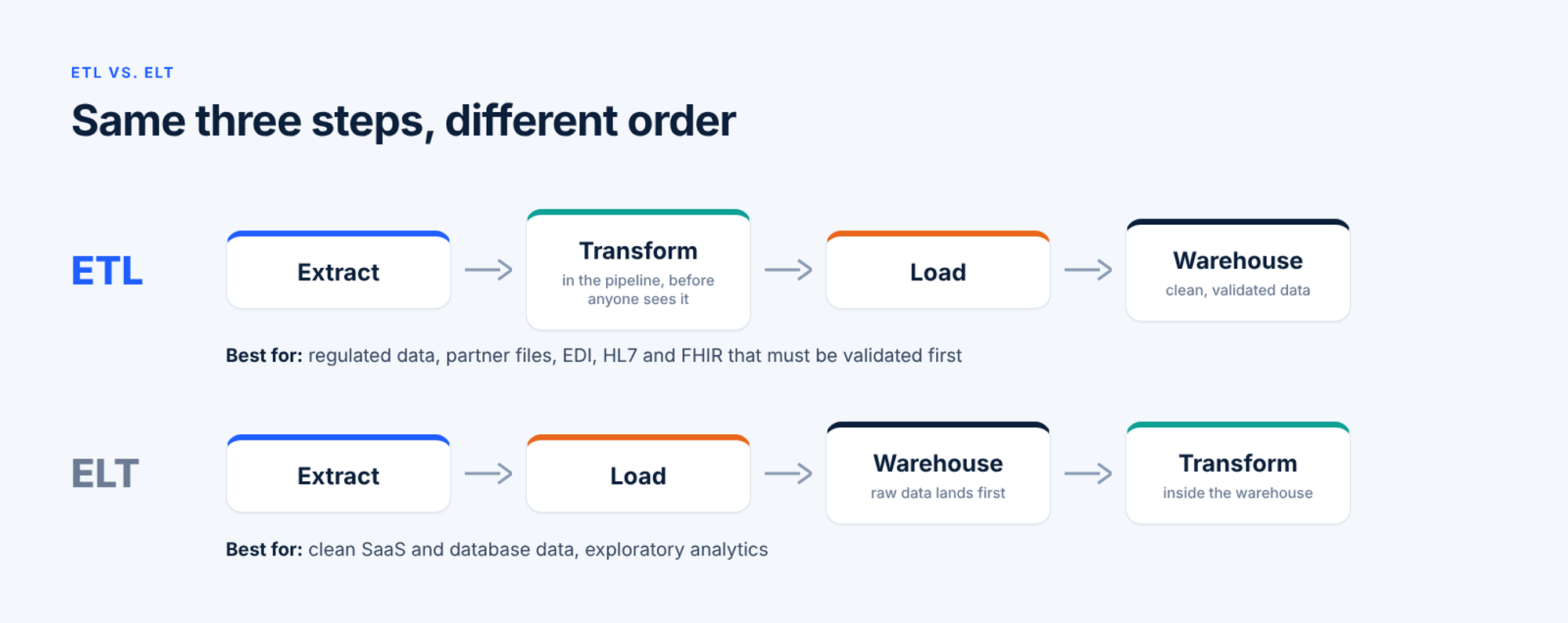
The difference between ETL and ELT is the order of the last two steps. ETL transforms data before loading it. ELT loads raw data first and transforms it inside the data warehouse using its own compute. Most enterprise stacks use both, so the question is which approach fits each data flow.
ETL Use Cases: When ETL Is the Right Fit
ETL is the stronger choice when data must be validated, masked or standardized before anyone sees it. That includes regulated data such as protected health information and financial records, inbound partner files where formats vary by sender, and industry formats like EDI X12, EDIFACT, HL7, FHIR or fixed-width files that need parsing and mapping before they are useful. It also fits any workflow where a bad record should be stopped and corrected rather than loaded and flagged.
ELT Use Cases: When ELT Makes More Sense
The load-first approach works well when source data is already clean and structured, for example when replicating SaaS tables into a cloud warehouse. Analysts get raw data quickly, and it suits exploratory analytics where teams do not yet know which transformations they need. The trade-off is governance: raw data, sensitive fields included, sits in the target, and data quality problems surface later, often in a report.
On-Premises, Cloud, and Hybrid Deployment Considerations
Where an ETL tool runs matters as much as which pattern it uses. Cloud deployment offers elastic scale. On-premises deployment keeps data inside your network, which some regulators and contracts require. Hybrid deployment processes sensitive data close to its source while loading results to the cloud.
For regulated enterprises, the requirement is flexibility at the connection layer. When a platform abstracts sources and targets behind connectors, moving a target from Amazon S3 to Azure Blob, or a source from Salesforce to HubSpot, becomes a configuration change instead of a re-engineering project.
Data Sources for ETL: Where BI Data Actually Comes From
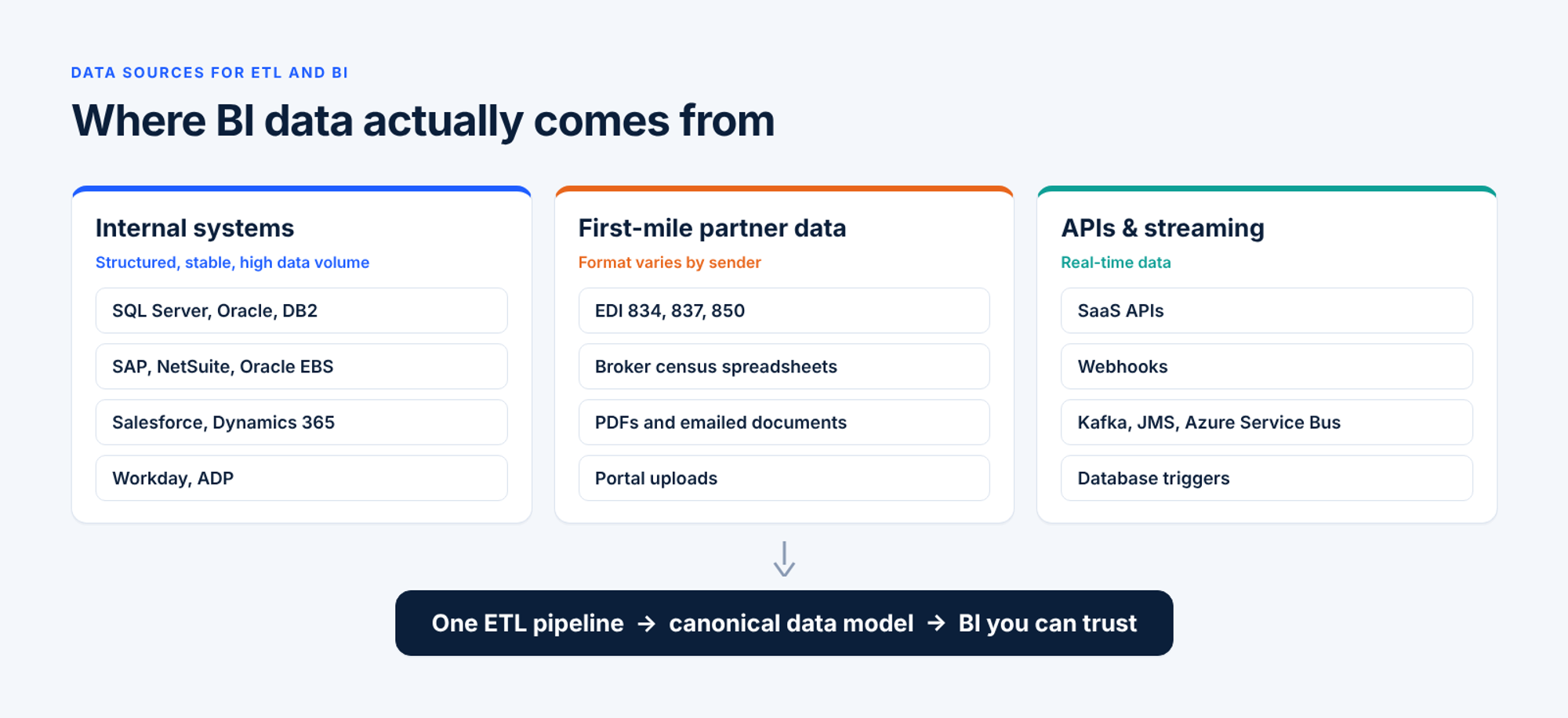
Most ETL discussions focus on internal databases. In practice, some of the most important BI data, and the hardest to integrate, comes from outside the enterprise.
Databases, ERP, and CRM Systems
Internal systems of record are the backbone of most BI programs: SQL Server, Oracle, PostgreSQL and DB2 databases, ERP platforms such as SAP, NetSuite and Oracle EBS, CRM systems such as Salesforce and Microsoft Dynamics 365, and HR and payroll systems such as Workday and ADP. This data is structured and fairly stable, which makes it a good fit for CDC or scheduled incremental extraction.
The challenge is data volume and change. A system upgrade or a new custom field can ripple into the pipeline, and a nightly job processing 50,000 payroll contribution records still has to finish before 6 AM.
Partner, Supplier, and Customer Data (the First Mile)
The first mile is data that arrives from other companies: EDI 834 enrollment files from benefits administration platforms, 837 claim files from clearinghouses, 850 purchase orders from retail customers, census spreadsheets from brokers, and PDFs sent by email. Every sender has its own format, schedule and quality level. A national health carrier, for example, may receive 834 files from 40 or more benefits platforms, each encoding the same standard differently.
First-mile data feeds the business reports leaders care most about: revenue, membership, claims and supply chain performance. It is also where most integration backlogs sit, because each new partner has traditionally meant a custom data mapping built by a developer, often 6 to 12 weeks per partner.
Documents belong here too. Insurance applications, supplier certifications and claim attachments all hold data that reporting needs. When document extraction runs on a separate OCR tool, the enterprise ends up with two pipelines and two audit trails. An ETL tool for enterprise BI should treat document data as a first-class source in the same pipeline as EDI and API data.
APIs, Cloud Apps, and Streaming Sources
SaaS applications, webhooks and message queues such as Kafka, JMS and Azure Service Bus add real-time data to the mix. An ecommerce order may need to reach the ERP and the analytics warehouse within seconds.
ETL pipelines therefore need to run at every cadence. Adeptia Automate runs real-time API calls, webhooks, file watchers, message queue consumers, database triggers and scheduled batch ETL jobs on the same runtime. Switching a data flow from batch to real-time data processing is a trigger setting, not an architecture change.
Onboard partner data in weeks, not months
Partners onboard against existing Adeptia Templates in 1 to 3 weeks instead of 6 to 12. See how AI-assisted mapping handles EDI, spreadsheets and documents.
Where the ETL Process Breaks Down in Regulated Industries
Insurance, healthcare, financial services and supply chain businesses face the same ETL challenges as everyone else, plus a few that make failures in the process more expensive.
Governance, Compliance, and Data Residency
Regulated data comes with rules about who can see it, where it can be stored and how long it must be kept. HIPAA, ACA enrollment requirements, IRS contribution limits, state insurance regulations and customer contracts all shape what an ETL pipeline may do. Data governance and data management therefore have to be built into the ETL process:
- Role-based access control, so internal teams and external partners see only the data they are entitled to
- Approval workflows and versioned rules, so an auditor can see which rule applied to which data on which date
- Audit trails for every run, showing what data came in, which rules fired and what data went out
- Deployment control, so data stays in the region the rules require
Rule maintenance is often the largest cost. A mid-sized health plan can face 20 to 40 validation rule changes per quarter, consuming 200 to 400 engineering hours to translate compliance language into code. The gap between a regulation's publication and deployment is typically 4 to 12 weeks, and during that window the data pipeline enforces the old rule.
Schema Drift and Silently Broken Pipelines
Schema drift happens when a source changes shape without warning: a partner adds a column, renames a field, changes a date format or starts sending a new code value. Traditional ETL jobs often keep running anyway. They load the wrong data or skip records, and nobody notices until someone spots a strange number weeks later.
The fix is visibility. Every ETL run should produce an execution record with its source data, processing log, validation results and final status. Transient failures should retry automatically, while validation errors route straight to an exception queue. Monitoring should also catch trends. In one example, Adeptia's Observe dashboard flagged that a benefits platform's 834 failure rate had risen 12% over seven days. The cause was a changed segment format, and the analyst fixed that partner's configuration the same morning.
Developer Dependency and Onboarding Backlogs
In many enterprises, only a small team of developers can build or change an ETL pipeline. Every new partner, field or business rule becomes a ticket. The people who understand the data best, such as compliance officers and underwriters, cannot author data mappings or rules themselves.
The same bottleneck affects partner support. When central operations answers every "did my file process?" question, headcount grows with partner count. The data exists, but it cannot reach the warehouse until a developer has time to map it.
Intelligent ETL: What Changes When AI Handles the Mapping
Intelligent ETL applies machine learning to the parts of data integration that have always consumed the most engineering time: data mapping, document extraction and validation rules. It moves the work from developers writing code to domain experts reviewing and approving proposals.
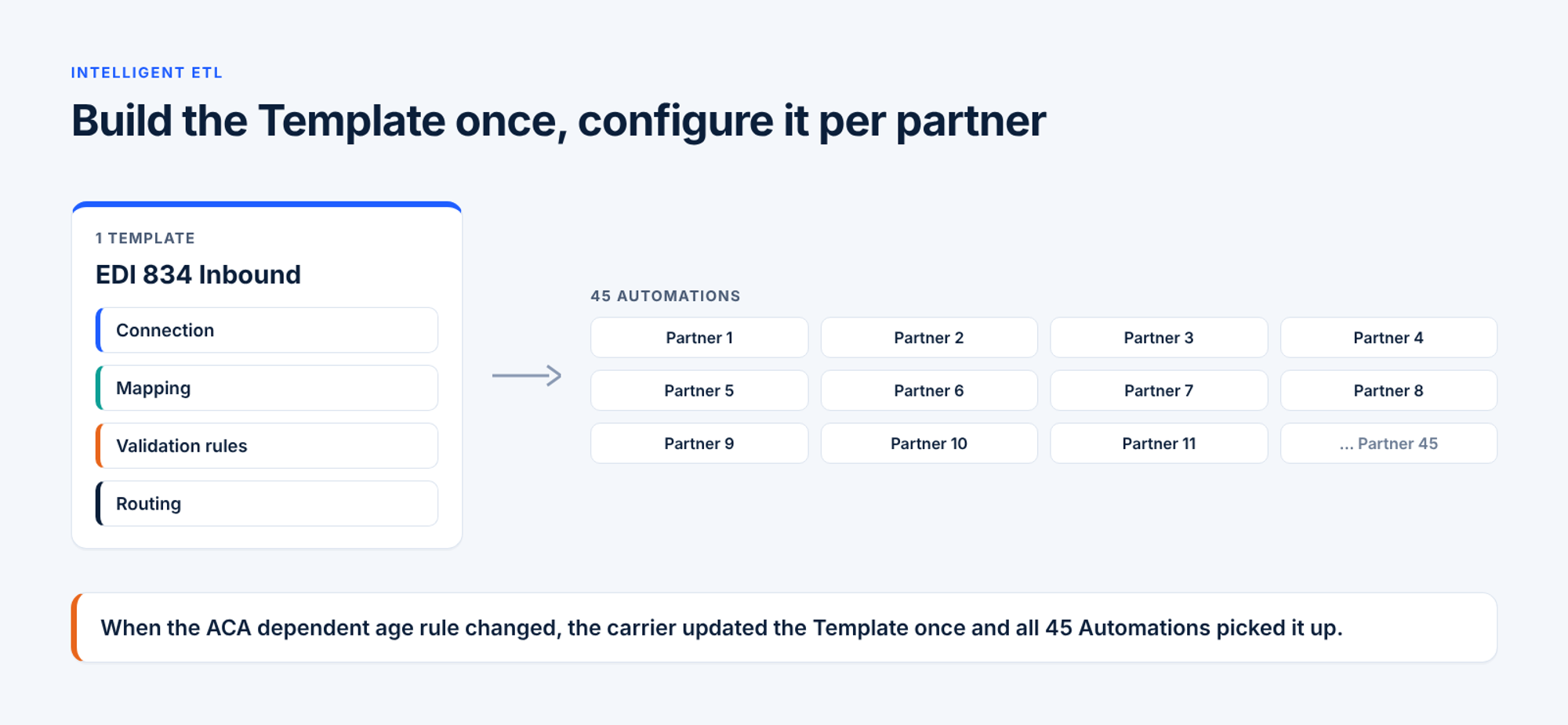
In Adeptia Automate, that work is packaged in reusable Templates. A Template encodes connection, mapping, validation and routing once, and each partner becomes an Automation, a configured instance of that Template. One national carrier runs 45 Automations from a single EDI 834 Inbound Template. When the ACA dependent age rule changed, the carrier updated it once and all 45 Automations picked it up.
AI-Assisted Data Mapping
Adeptia's AIMap uses two engines. Pattern-based machine learning matches new data layouts against a library of validated mappings. A generative model reasons over a plain-language objective, such as "normalize phone numbers and skip leads marked do not contact," plus an optional knowledge base of field glossaries and code lists. Each suggested match carries a confidence score, and the user reviews and approves it.
Mapping work that took weeks drops to hours. For the carrier receiving 834 files from 40-plus platforms, onboarding a new platform fell from 6 to 8 weeks to 1 to 2 weeks. Every approved mapping enriches the library, so the next similar data source maps faster, and customer data stays within the customer's tenant.
Configurable Business Rules
Adeptia's AI Business Rules let domain experts write data validation in plain English. A plan administrator might write: "If a 401(k) deferral exceeds the IRS 402(g) annual limit for the participant's age, route to the plan admin queue with full contribution detail." The engine compiles the rule into reviewable, executable logic and applies it to every Automation under the Template.
Rule changes pass through an approval workflow, activated versions are immutable, and role-based access separates who can author rules from who can approve them. Rule changes ship in days instead of release cycles, and analysts can see why data was rejected instead of guessing.
Human-in-the-Loop Workflow Orchestration
Not every exception can be fixed automatically. Human-in-the-loop orchestration sends records that need judgment to the right business owner with full context, while clean records keep flowing to the warehouse.
In Adeptia's Process Designer, one 834 process flow can parse the file, map the data to the canonical model, validate it, post clean data to the enrollment platform, send a 997 acknowledgment, load the analytics warehouse and route failures to an operations queue. Splitting and parallel processing let the same flow scale with data volume, from a few records a day to millions overnight.
Document data follows the same path. Adeptia's intelligent document processing combines OCR, computer vision and generative reasoning to extract structured data inside the same Template model. One carrier cut Evidence of Insurability turnaround from 8 to 12 weeks to 5 to 10 days, with 70% of clean cases auto-decided.
Partners can take part too. Self-managed partners log into their own scoped view, see their own data, correct errors and resubmit. One carrier moved roughly 70% of broker inquiry volume out of central operations this way.
Go deeper on Intelligent ETL
See how AI-powered mapping and validation keep integration pipelines running when schemas change, without manual rework.
How to Evaluate ETL Tools for Business Intelligence
The right ETL tool depends less on feature lists and more on where your data comes from and who will maintain each data pipeline.
Categories of ETL Tools
| Category | Typical strengths | Typical limits |
|---|---|---|
| Traditional enterprise ETL | Mature transformation engines, strong on-premises support | Developer-heavy; new partners take 6 to 12 weeks each |
| Cloud ELT and replication tools | Fast setup for SaaS and database data; scales with the target | Limited handling of partner data, EDI and documents |
| iPaaS and application integration | Broad connector libraries, API and workflow automation | Built for app-to-app sync more than analytics data quality |
| Open-source and code-first tools | Flexible, low license cost | Engineering time to build and operate |
| Intelligent ETL tools | Assisted mapping, plain-English rules, reusable templates, first-mile partner data | Newer category; check governance and deployment fit |
Evaluation Criteria That Actually Matter
Test each ETL tool against your own data, not a vendor's demo data. Focus on:
- Source coverage. Can the tool handle EDI, HL7, fixed-width files, PDFs and APIs, not just databases? Adeptia ships 130+ pre-built connectors.
- Time to onboard a new source. How long from a new partner file to usable data: days or months?
- Who maintains it. Can analysts adjust data mappings and rules, or does every change need a developer?
- Reuse. Does a template built for one partner carry over to the next?
- Data quality controls. Are rules visible, versioned and auditable?
- Observability. Can you see what failed, where and why on every run?
- Execution flexibility. Are real-time, batch and event-driven triggers supported on one runtime?
- Governance and deployment. Does the tool offer role-based access, audit trails and the deployment model your compliance team requires?
Best Practices for ETL in Reliable BI
These practices apply whichever ETL tool you choose:
- Start from the business question. Define the reports and metrics needed, then design the data model backward from them.
- Map to a canonical data model. Translate every source into one shared model so reports never see partner-specific quirks.
- Validate at the edge. Check data as it enters the pipeline, especially first-mile partner data, so bad records never reach the warehouse.
- Keep business rules readable. Store data validation logic where business owners can read and approve it.
- Design for schema drift. Detect new or missing fields and alert on them instead of failing silently.
- Load incrementally and idempotently. Use CDC to keep data fresh, and make each ETL rerun safe.
- Reconcile source to target. Compare record counts and control totals on every run.
- Separate transient from permanent failures. Retry timeouts automatically; send validation failures to people.
- Build templates, not one-off pipelines. Encode each pattern once and configure it per partner.
- Document data lineage. Users should be able to trace any dashboard number back to its source data.
Watch: Intelligent ETL for AI-Ready Data
See how AI-native automation turns fragmented partner and enterprise data into clean, analytics-ready data.
How to Measure ETL Success in Your BI Environment
ETL success shows up in how much business users trust and use BI analytics. Track a small set of metrics that tie pipeline health to business outcomes:
| Metric | What it tells you |
|---|---|
| Pipeline success rate | Share of ETL process runs that complete without failure |
| Data freshness | Time from an event in the source to data availability in reporting |
| Exception rate and resolution time | How often data fails validation, and how quickly it is fixed |
| Source-to-target reconciliation | Whether data counts and totals match between source and target |
| Time to onboard a new source | Days from a new partner or system to usable data |
| Rule change lead time | Days from a regulatory or policy change to the rule running in production |
| Partner inquiries to central operations | How much support work self-service has absorbed |
| Report disputes | Whether people still ask for "the real number" |
The last metric is the most telling. When business users stop checking dashboards against spreadsheets, the ETL process is doing its job.
Turn Fragmented Enterprise Data into BI You Can Trust
Business intelligence is only as good as the data that feeds it, and for most enterprises that data is spread across internal systems and hundreds of outside partners. A reliable ETL process, with validation at the edge, readable business rules, reusable templates and run-level visibility, turns that fragmented data into analytics people trust.
Adeptia Automate is an Intelligent ETL platform that connects, translates, validates and orchestrates enterprise data, including the first-mile partner data and documents traditional ETL tools struggle with. Partners onboard against existing Templates in 1 to 3 weeks instead of 6 to 12, and Fortune 1000 companies run it in production.
Schedule a demo and bring a real workflow your team is working through. We'll show it running on your data in 60 minutes.
See Intelligent ETL running on your data
Bring a real workflow. We'll show it running on your data in 60 minutes.